Behringer U-Phoria UM2 vs UMC204HD: Ultimate Guide
- Audio Interface, Comparisons
- by Bruno Bontempo
Discover the key differences between Behringer U-Phoria UM2 vs UMC204HD. Compare features, performance, and ideal use cases to choose the right audio interface for your needs.
Our articles may include affiliate links and we may earn a commission. Here how it works.
Table of Contents
Overview
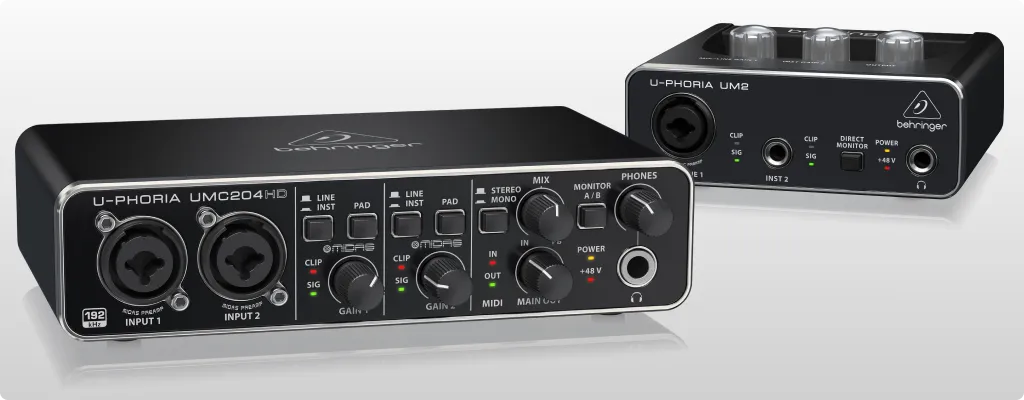
Choosing the right audio interface can be challenging, especially when comparing two solid options like the Behringer U-Phoria UM2 and UMC204HD. Both interfaces offer excellent value for their price points, but they’re built for different use cases.
The UM2 is ideal for beginners or solo creators, while the UMC204HD caters to those needing extra versatility, including MIDI connectivity and improved sound quality.
In this guide, I’ll break down their features, highlight key differences, and explain which model suits your needs better, whether you’re a musician, podcaster, or content creator.
U-Phoria UM2
4.0

- Inputs: 1 XLR/TRS combo + 1 Hi-Z
- Outputs: 2 RCA + 1 headphone
- Resolution: 16-bit/48kHz
- Compatibility: Mac, PC
- Plus Xenix preamp, direct monitoring and phantom power
Best Deal
| Pros
- Combo input with phantom power
- Clear sound quality for its price
- Low-latency direct monitoring
- Affordable and beginner-friendly
| Cons
- Limited resolution
- No MIDI I/O
- Basic RCA outputs
READ FULL REVIEW
U-Phoria UMC204HD
4.4
- Inputs: 2 XLR/TRS combo + MIDI I/O
- Outputs: 2 balanced TRS + 1 headphone
- Resolution: 24-bit/192kHz
- Compatibility: Mac, PC
- Plus MIDAS preamp, direct monitoring and phantom power
Best Deal
| Pros
- Professional grade MIDAS preamps
- MIDI I/O for flexible setups
- Extended output capacities
- Exceptional value for the price
| Cons
- Slightly bulkier than the UM2
- Latency (delay) control could be better
READ FULL REVIEW
Key Differences
- Audio Quality: The UMC204HD offers superior resolution (24-bit/192kHz) compared to the UM2’s 16-bit/48kHz. This means better sound clarity and dynamic range for professional recording.
- Connectivity: The UMC204HD includes MIDI I/O, making it a better choice for integrating keyboards and other MIDI gear.
- Outputs: Balanced TRS outputs on the UMC204HD provide cleaner signals for studio monitors compared to the UM2’s unbalanced RCA outputs.
- Price: The UM2 is much more affordable, making it ideal for beginners on a budget
Specs Table
| Feature | U-Phoria UM2 | U-Phoria UMC204HD |
|---|---|---|
Simultaneous I/O |
2×2 |
2×4 |
XLR Mic Input |
1 |
2 |
Hi-Z Inputs |
1 |
1 |
Line/Monitor Outputs |
2 RCA |
2 Balanced TRS |
Headphone Output |
1/4″ Jack |
1/4″ Jack |
MIDI I/O |
No |
Yes |
Compatibility |
macOS, Windows |
macOS, Windows |
Resolution |
16-bit/48kHz |
24-bit/192kHz |
Phantom Power |
Yes |
Yes |
Direct Monitor |
Yes |
Yes |
Best Deal |
Final Thoughts
When comparing the Behringer U-Phoria UM2 vs UMC204HD, it’s clear that both models cater to different audiences.
The UM2 is perfect for beginners or casual creators who want an affordable, no-frills interface for basic recording.
On the other hand, the UMC204HD offers more advanced features like MIDI I/O, balanced outputs, and higher resolution, making it suitable for musicians or podcasters who need professional-grade sound.
If you’re just starting out, the UM2 is a budget-friendly way to get into recording. But if you need more versatility and superior audio quality, the UMC204HD is worth the extra investment.
FAQ
What is the main difference between Behringer U-Phoria UM2 and UMC204HD?
The main differences are in audio resolution, connectivity options (MIDI and balanced outputs on the UMC204HD), and price.
Which interface is better for musicians?
The UMC204HD is better for musicians due to its superior preamps, balanced outputs, and MIDI integration.
Do both interfaces work with macOS?
Yes, both interfaces are compatible with macOS and Windows.

Bruno Bontempo
I've been recording, producing, and playing bass for over 20 years—from touring with my first band at 15 to playing progressive metal across Europe today. Through multiple albums, projects (Madness of Light, Rising Course, Roots of Ascendant, Human|Archive), and production work, I've tested audio interfaces in every scenario imaginable. At Best Audio Hub, I combine my historian background with years of hands-on music and audio experience. No marketing fluff—just honest insights from someone who's been in the trenches.
| ALSO REVIEWED